Next-gen arbitrage · Gold · FX · CFD · MetaTrader 5

The robot knows the price before it reaches.

The #1 trading strategy the brokers don't want you to use.

MASTER reads live ticks from your fast price-feed broker and streams them to RAZOR, which sees where your execution broker's quote is about to move — and fires the trade before it gets there. Built for Gold, FX and CFD, with full risk controls, hedge support, and on-chart visual confirmation.

  • 2 EAsMASTER + RAZOR
  • MT5Compiled .ex5 experts
  • 40+Tunable parameters
  • CSV bridgeNo external server
LIVE GAP MONITOR SYMBOL: EURUSD
MASTER · fast broker RAZOR · slow broker
CURRENT GAP0.0 pips
ENTRY THRESHOLDspread × 1.1 + 10
MEASURED LAG— ms
TRADES FIRED0

Instant gap-detection technology

RAZOR compares both feeds on every tick and locks onto the mispricing the moment it opens — no lag, no guesswork.

Fires before the gap closes

The instant the spread clears your threshold, the trade is already in — reacting to a move that has already happened, not predicting one.

Desk-grade risk controls

Safety floors, drawdown brakes, spread filters, hedge protection and invisible stops — built in, always on.

First to market

A private engine — now the first and only one of its kind on the market.

We didn't license this from anyone. MASTER and RAZOR were built in-house as our own private trading engine and used quietly for our own accounts. No one else has brought a system like this to the commercial market — until now.

01

Privately developed

Built from scratch as our own engine — not resold third-party code, not a rebranded template. You get protected, compiled .ex5 experts, tuned by the people who actually trade them.

02

First to commercialize

This was a personal product we never intended to sell. We're the first to take a working private latency-arbitrage engine and release it commercially.

03

Next generation, not the old model

This isn't the old-style latency arbitrage brokers already know how to spot. It's a next-generation arbitrage engine built for Gold, FX and CFD trading — with no comparable commercial system on the market today.

Market structure, explained

How latency arbitrage trading actually works

Every broker builds its own price feed, and no two feeds update at exactly the same moment. Latency arbitrage exists in the gap between them.

A broker's quote stream is the end of a pipeline: liquidity providers publish prices, the broker's servers aggregate and process them, and the result is pushed out to your trading terminal. Each stage in that pipeline takes time.

Direct-market-access brokers (typically ECN/STP models) keep that pipeline short, often updating in single-digit milliseconds. Market-making brokers that internally warehouse client risk frequently run a longer pipeline — dealing-desk processing, price smoothing, or simply slower infrastructure — which can leave their displayed quote tens to hundreds of milliseconds behind the real market.

The strategy isn't forecasting where price goes next — it's reacting to a move that has already happened elsewhere and hasn't been priced in yet.

The mechanism

Three moving parts, one shared file

No sockets, no external server, no third-party bridge software. MASTER and RAZOR talk through a single CSV file, updated on every tick.

  1. MASTER

    MASTER feeds

    Running on your fast-quote broker, MASTER timestamps every tick, computes the mid-price, and writes it to Master_[SYMBOL].csv — as fast as ticks arrive, with a spread filter so bad quotes are never published.

  2. RAZOR

    RAZOR detects

    Running on your execution broker, RAZOR reads that file continuously, compares the master price to its own broker's quote, and calibrates the expected lag over a rolling window of ticks (default: 3,003) before it ever trades.

  3. RAZOR

    RAZOR executes

    The instant the gap clears your configured entry threshold, RAZOR opens the position on the slow broker — then manages stop, target, trailing, and exit-gap logic tick by tick until it closes.

MASTER and RAZOR don't need the same machine — only the same shared "Files" directory. A lightweight Windows VPS positioned close to both brokers is the typical setup.

See it live

Watch the two feeds — and the moment RAZOR fires

This is a real recording of the engine running. The chart plots both brokers' prices side by side, and RAZOR opens a trade the instant the gap between them clears your threshold.

Everything under the hood

Built like an execution desk, not a script

RAZOR's inputs are grouped exactly like a trading desk's risk manual: safety limits first, then entry logic, then trade management, then the advanced controls you'll grow into.

Safety & capital protection

Safety limit
Trading halts automatically the moment balance drops below a floor you set.
Profit limit
Optionally stop the EA once balance climbs above a target you're happy with.
Risk management %
A rolling drawdown brake — measured from the account's peak balance, not its starting balance.
Hedge error exit
Stands down automatically if a hedge leg fails to open, rather than leaving you one-sided.

Entry logic

Lag calibration
Auto-measures the real lag between brokers over a rolling tick window, or lock a fixed lag manually.
Dynamic entry gap
Entry threshold scales with the live spread instead of one fixed number all session.
Spread filter
Refuses new entries the moment your execution broker's spread blows out.
Lot sizing
Fixed lot, or auto-scaled to balance with a hard maximum lot ceiling.

Trade & position management

Exit-gap logic
Closes a position once the master/slave gap narrows back to a level you define — not just fixed TP/SL.
Hold-time window
Minimum and maximum time a position is allowed to stay open.
Trailing stop
Point-based trailing with its own floor and ceiling, independent of the initial stop.
Invisible stops
Server-invisible SL/TP/trailing calculated internally, with an adjustable trailing exponent.

Advanced & optional tools

Execution watchdog
Auto-downsizes to minimum lot if fills start taking too long — a slippage safeguard.
Loss-streak sizing
Cuts position size after a defined number of consecutive losers.
Hedge-mode support
Runs on hedging accounts with a configurable cap on simultaneous hedge pairs.
On-chart visuals
Live master (blue) and slave (violet) price lines so you can watch the two feeds track each other.

Reference

Full parameter reference

Nothing hidden. Every configurable input across both EAs, exactly as it ships.

See RAZOR's real MT5 inputs panel, exactly as it loads in MetaTrader 5.

ParameterDefaultPurpose
CSVFileDirectorypathLocation of the shared bridge file written by MASTER.
MasterSymbolName""Maps to MASTER's symbol if the two brokers name it differently.
FixedLag0Manually locked lag value, in points, overriding auto-calibration.
LagTicks3003Number of ticks used to auto-calibrate lag before trading begins.
RobotSleep50 msEngine loop interval — how often RAZOR re-reads the bridge file.
SafetyLimit / ProfitLimit0.0 / 0.0Balance floor and ceiling that halt trading.
RiskManagement10.0 %Drawdown-from-peak brake.
LotSize / AutoLot / MaxLot0.01 / off / 50Fixed or balance-scaled position sizing with a hard cap.
MaxSpread30Blocks entries when execution-broker spread is too wide.
EntryGapAdd / EntryGapMult10 / 1.1Dynamic entry threshold formula, scaled off the live spread.
StopLoss / TakeProfit40 / 800Fixed protective levels, in points.
PositionMinimalTime / MaximalTime0 / 900 sFloor and ceiling on how long a position may stay open.
UseExitGap / ExitGaptrue / 2Closes a position once the gap narrows to this value.
Trailing / Min / Max30 / 0 / 0Point-based trailing stop with its own floor and ceiling.
InvisibleSL / TP / Trailing / Exponent0 / 0 / 0 / 2.0Server-invisible protective levels calculated client-side.
MaxExecutionMsToMinLot1000 msDrops to minimum lot if fills take too long.
MaxLostPositionsToMinLot3Reduces size after a streak of consecutive losers.
UseHedge / MaxHedgePairsoff / 5Hedging-account support with a cap on concurrent pairs.
TimeToTime / StartTime / StopTimeoffOptional trading-session window.
MagicNumber / CommentField54258 / ""Order tagging alongside other strategies.
Visual / line styles & colorsblue + violetOn-chart master/slave price lines for visual confirmation.
LogDebugtrueVerbose execution logging for auditing fills and rejections.

Real results

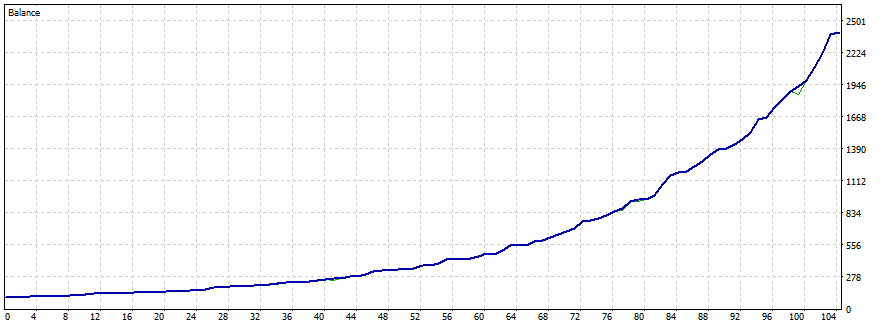
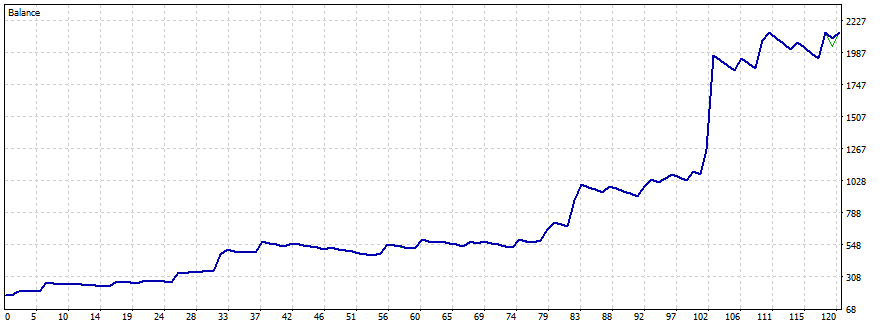
Real account growth — different brokers, different periods

These are real MetaTrader 5 balance curves from live use of MASTER + RAZOR. Each one is a different broker, a different time period and different settings — which is exactly why results vary from account to account.
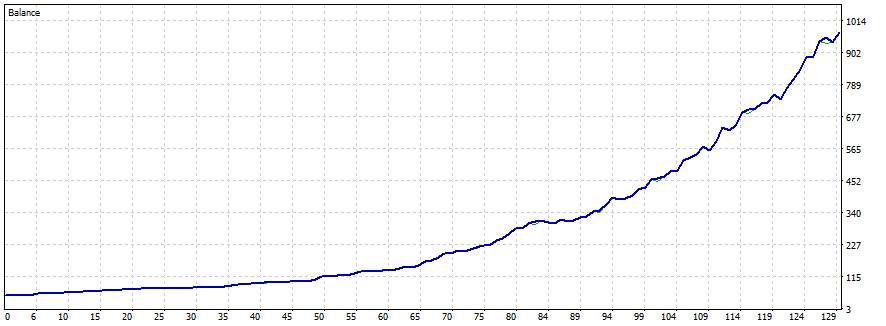
$50 → $974
MT5 account balance curve growing from $50 to $974
Balance grew from $50 to $974.
$170 → $2,142
MT5 account balance curve growing from $170 to $2,142
Balance grew from $170 to $2,142.
$100 → $2,400
MT5 account balance curve growing from $100 to $2,400
Balance grew from $100 to $2,400.

Every screenshot above comes from a different broker, at a different time and with different settings — so treat them as examples, not a promise. Past performance never guarantees future results, and you will have losing trades too. See the risk & compliance notice.

Before you deploy

What you'll need

You source and open your own broker accounts. This robot doesn't work on every broker — it performs on an execution broker whose feed lags enough for the strategy, which you find and tune the settings to yourself. We provide the software; we don't provide broker accounts.

License

One license. Both EAs. Ready to run.

No subscription and no recurring fees. You get the compiled MASTER + RAZOR .ex5 experts, ready to drop into MetaTrader 5 and run.

  • MASTER EA — compiled .ex5 expert
  • RAZOR EA — compiled .ex5 expert
  • Unlimited MT5 accounts over the license lifetime — one active execution account at a time. Move to a new account 24 hours after the EA was last started.
  • Installation guide & configuration manual
  • Setup video walkthrough
  • Lifetime updates & technical support

Delivered to your email within 24 hours after your payment is confirmed. Pay with crypto (USDT — TRC20, BSC, Solana or ERC20).

LIFETIME LICENSE
$500one-time

Covers the full MASTER + RAZOR pair and every parameter on this page.

Get instant access Questions? Read the FAQ Crypto payment (USDT) · Automatic activation on confirmation

FAQ

Frequently asked questions

Does it work with every broker?

No — and this is important. This robot does not work on every broker. It only performs on an execution broker whose price feed lags enough for the strategy to work, and you have to find that broker yourself and tune the settings to it. Finding and testing a suitable broker is part of using the system — the software gives you the engine and the controls, but the right broker choice is yours to make.

Do you provide broker accounts?

No. We sell the software only — we do not open, provide, or sell any broker or MT5 accounts. You source and open your own broker accounts, then activate the EAs on them. This is standard for this kind of product; anyone experienced with latency arbitrage sources their own brokers.

Do I need two broker accounts?

Yes. One account acts as the fast price feeder (no trades placed on it) and the other as the execution broker where all positions open and close. You open both yourself.

Is a VPS required?

Strongly recommended. A low-latency Windows VPS positioned close to both brokers reduces delay and improves execution speed — every millisecond matters.

How does activation work?

No account numbers needed. Once your payment confirms, your license is activated and the compiled experts are emailed to you within 24 hours. When you attach the RAZOR EA, it registers your MT5 account at that moment — the check runs only at start-up, so once the robot is running it keeps running without re-checking. Your license works on unlimited accounts over its lifetime, but only one active execution account at a time. To switch to a different account or device, start the EA there 24 hours after it was last started on the previous account — the license then moves over automatically. It's an unlimited-accounts license on a 24-hour pulse, not a multi-account-at-once license.

How is the product delivered?

By email. After your payment is confirmed and approved, we send the compiled MASTER + RAZOR .ex5 experts and setup materials to your email within 24 hours — there's no public download.

Is this a "set and forget" system?

The software is fully automated after configuration, but like any professional trading system, periodic monitoring and optimization are recommended — broker conditions change over time.

Risk & compliance notice

Latency arbitrage exploits pricing lag between brokers, and many brokers explicitly prohibit this style of trading in their terms of service. Accounts identified as running this kind of strategy can have profits voided, positions closed, or accounts terminated at the broker's discretion. Read your execution broker's terms before deploying, and consider brokers that permit arbitrage strategies.

Forex and CFD trading involves substantial risk and may not be suitable for all investors. This software is a trade-execution tool, not investment advice. Performance depends on broker execution speed, network latency, VPS quality, liquidity, and market conditions. Past performance does not guarantee future results, and no trading software can guarantee profits. You are solely responsible for your own trading decisions, broker selection, and compliance with the terms you agree to.

Ready to trade the gap?

Get the compiled MASTER + RAZOR pair — unlimited accounts (one active execution account at a time, 24-hour move), lifetime updates, delivered to your inbox.

Get instant access